
Social Media Prompts for ChatGPT: Examples & How to
Tasks that once took hours are now being optimized by AI. Tools like Canva, Lightroom, CapCut, and Adobe have integrated AI features that simplify graphics and video creation.
Creative blocks have always been a challenge, but with the rise of AI, you can now ideate faster and unlock fresh creative ideas effortlessly. That’s why ChatQuick exists — to help you generate powerful social media prompts for ChatGPT and any other AI or social media tool you use, so you can stay inspired and create with ease.
What Are Social Media Prompts for ChatGPT?
Social media prompts are predefined instructions or ideas you give to ChatGPT (or any AI tool) to help generate specific types of social media content — like captions, post ideas, scripts, or ad copies.
They act as a creative spark, guiding the AI to produce tailored content faster and with more precision, whether you’re posting on Instagram, LinkedIn, TikTok, or YouTube.
5 Benefits of Using Social Media Prompts
- Save Time:
You no longer start from scratch—prompts help you generate high-quality posts in seconds. - Overcome Creative Blocks:
When you’re out of ideas, prompts inspire fresh, relevant content directions. - Ensure Consistency:
Prompts help maintain your brand’s tone, voice, and posting frequency effortlessly. - Boost Engagement:
With well-crafted prompts, you can create content that resonates better with your audience and drives interaction. - Adapt Across Platforms:
A single prompt can be adjusted to create tailored content for multiple platforms—like a tweet, carousel, or video script.
Social Media Prompt Examples
Generate a social media post for [Platform: e.g., Instagram, Twitter, Facebook] targeting [Target Audience: e.g., young adults interested in sustainable fashion] about [Topic: e.g., new sustainable clothing line launch]. The post should be [Tone: e.g., informative, humorous, inspirational] and include [Call to Action: e.g., visit website, follow page, like post]. The post should be approximately [Character Limit: e.g., 280 characters for Twitter, 2200 characters for Facebook] and include a relevant [Image/Video Description: e.g., image of models wearing the clothing, short video showcasing the clothing’s features]. Use relevant hashtags such as [Hashtags: e.g., #sustainablefashion, #ecofriendlyclothing, #newcollection]. Consider A/B testing different versions of the post focusing on [Specific A/B test elements: e.g., different calls to action, images, or headlines].
Generate a social media post for [Platform: e.g., Instagram, Twitter, Facebook] targeting [Target Audience: e.g., young adults interested in sustainable fashion] to [Desired Outcome: e.g., increase brand awareness, drive traffic to website, promote a new product]. The post should be [Tone: e.g., informative, humorous, inspirational] and include [Keywords: e.g., sustainable, ethical, fashion, eco-friendly]. Include a compelling call to action. Keep the character count under [Character Limit: e.g., 280 for Twitter, 2200 for Facebook]. Consider using relevant hashtags.
Develop a detailed social media campaign plan for [Target Audience] to promote [Product/Service/Brand]. The campaign should run for [Duration] and aim to achieve [Specific Goals, e.g., increase brand awareness by 20%, generate 500 leads]. Include:
- Target Audience Definition: Describe your ideal customer, including demographics, psychographics, online behavior, and preferred social media platforms.
- Key Messages: Craft 3-5 concise and compelling key messages that resonate with your target audience and highlight the unique value proposition of [Product/Service/Brand].
- Content Pillars: Identify 3-5 core themes or topics that will guide your content creation. These should align with your key messages and resonate with your target audience’s interests.
- Content Calendar: Create a sample content calendar for the first [Number] weeks of the campaign, specifying the type of content (e.g., image post, video, story, live stream), platform, key message, and posting schedule.
- Platform Strategy: Detail your approach for each relevant social media platform (e.g., Facebook, Instagram, Twitter, TikTok, LinkedIn), including content format, posting frequency, and community engagement strategies.
- Metrics and Measurement: Identify key performance indicators (KPIs) to track the success of the campaign (e.g., reach, engagement, website traffic, conversions). Explain how you will measure these KPIs.
- Budget Allocation: Provide a preliminary budget allocation for the campaign, considering content creation, advertising, and any other relevant costs.
- Contingency Plan: Outline potential challenges and a plan to address them.
Create a social media post for [Platform: e.g., Instagram, Twitter, Facebook] targeting [Target Audience: e.g., young adults interested in sustainable fashion] with the goal of [Desired Outcome: e.g., driving traffic to a new product page, increasing brand awareness, encouraging user engagement]. The post should include [Tone: e.g., informative, humorous, inspirational] and [Key Message: e.g., highlighting eco-friendly materials, showcasing a new collection, announcing a sale]. Include a relevant [Call to Action: e.g., shop now, learn more, comment below] and consider using [Visual elements: e.g., high-quality image, short video, GIF]. Keep the character count under [Character Limit: e.g., 280 for Twitter, consider platform limits]. Example: “Introducing our new sustainable sweater collection! Made with 100% recycled materials, these cozy sweaters are perfect for fall. Shop now and use code ECO10 for 10% off! #sustainablefashion #newcollection #fallfashion”
Compose a social media post for [Platform: e.g., Instagram, Twitter, Facebook] targeting [Target Audience: e.g., young adults interested in sustainable fashion] with the goal of [Desired Outcome: e.g., driving traffic to a new product page, increasing brand awareness, generating leads]. The post should include [Content elements: e.g., high-quality image/video, a compelling headline, a clear call to action, relevant hashtags]. Keep the tone [Tone: e.g., friendly, informative, humorous] and ensure the post length is appropriate for the chosen platform. Provide three variations of the post.
How to Generate AI Social Media Prompt for ChatGPT Using Wordwriter
Follow these simple steps to create effective social media prompts that work across ChatGPT, Wordwriter, and other AI tools:
Step 1: Visit the ChatQuick Website

Go to the ChatQuick website and either log in or try it for free to get started.
Step 2: Access the AI Library
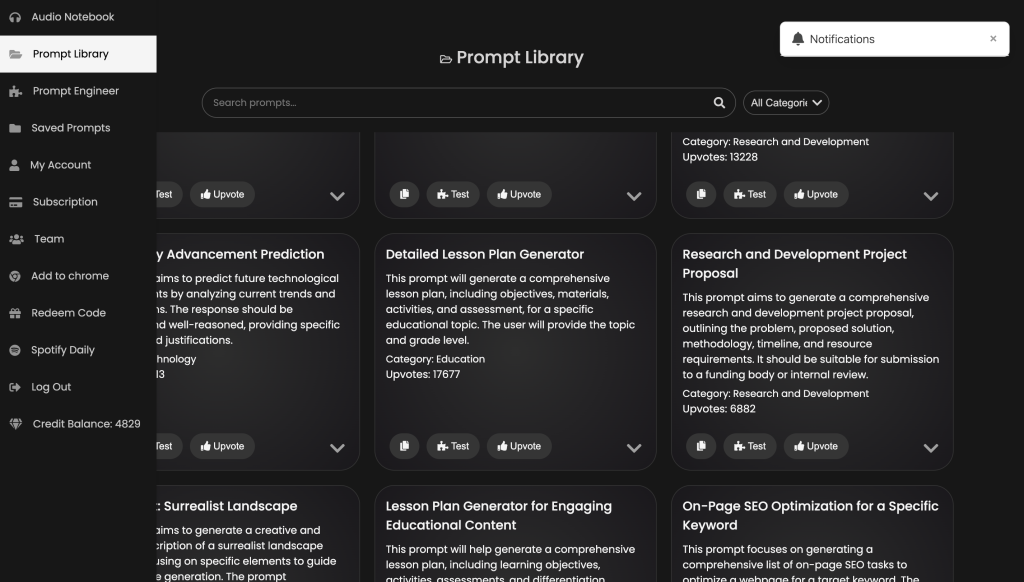
At the top right corner, click on the AI Library tab to explore a wide range of ready-to-use AI templates.
Step 3: Search for the Social Media Prompt Tool
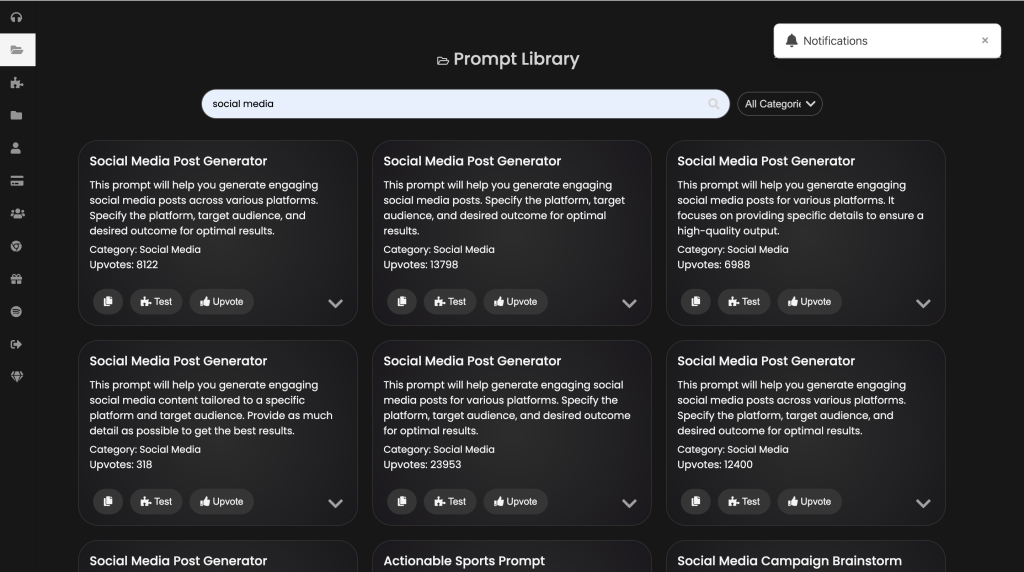
Use the search bar to find the Social Media Prompt Tool — it’s designed to help you create post ideas, captions, and content outlines effortlessly.
Step 4: Copy and Use the Prompt
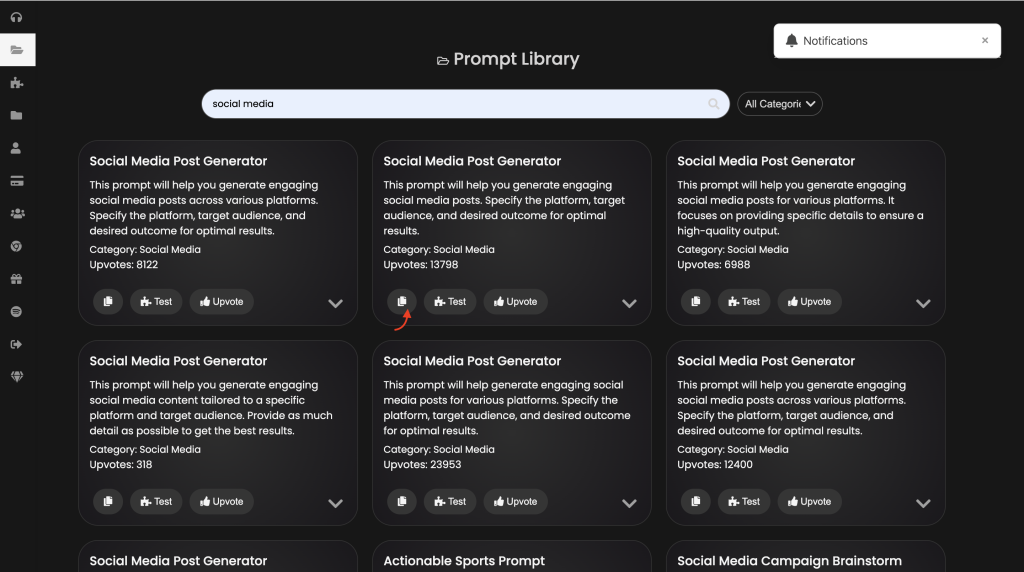
Once you find it, copy the prebuilt prompt and use it on any AI tool (like ChatGPT) to generate engaging social media content in seconds.
Step 5: Get Creative
Customize the generated ideas to match your brand’s tone, audience, and goals — and watch your social media presence grow.
Conclusion
With ChatQuick, you don’t have to struggle with creative blocks or blank screens anymore. Whether you’re a content creator, marketer, or business owner, ChatQuick helps you turn ideas into scroll-stopping posts in seconds. Start exploring the Social Media Prompt Tool today and let AI take your creativity to the next level.
